利用公网服务器加速gradle构建总结
利用公网服务器加速gradle构建总结
前言
你需要一台拥有公网IP的服务器,请勿用于非法用途!!!
下载
- singbox v1.13.14 //我就不提供下载方法和路径了
- nssm //点击前往官网下载, 自行安装, 自行配置环境变量, 不懂就问ai
服务端配置
请自己生成证书密钥对,自行替换目录,自行修改密码
1
2
3
4
5
6
7
8
9
10
11
12
13
14
15
16
17
18
19
20
21
22
23
listen: :80

tls:
  cert: /path/to/server.crt
  key: /path/to/server.key

auth:
  type: userpass
  userpass:
    tianxuan: txpsqwer
    honor30: hpsasdfqwer
    pixel4: ppsasdfasdf
    matepad104: mpsasdfasdf

trafficStats:
  listen: :2134
  secret: psasdfsafsdafasdf

masquerade:
  type: proxy
  proxy:
    url: https://bing.com # 伪装网站
    rewriteHost: true
singbox客户端配置
- json文件中记得删除所有注释性文本
//以及后面的文字 - 本配置不会让singbox以网卡模式运行,而是混合监听了9000端口,所以任何想要通过代理来加速的软件都要手动配置本地代理,这里后续会讲到.
1
2
3
4
5
6
7
8
9
10
11
12
13
14
15
16
17
18
19
20
21
22
23
24
25
26
27
28
29
30
31
32
33
34
35
36
37
38
39
40
41
42
43
44
45
46
47
48
49
50
51
52
53
54
55
56
57
58
59
60
61
62
63
64
65
66
67
68
69
70
71
72
73
74
75
76
77
78
79
80
81
82
83
84
85
86
87
88
89
90
91
92
93
94
95
96
97
98
99
100
101
102
103
104
105
106
107
108
109
110
111
112
113
114
115
116
117
118
119
120
121
122
123
124
125
{
  "log": {
    "level": "error",
    "disabled": true,
    "timestamp": true,
    "output":"logs.txt"
  },
  "dns": {
    "servers": [
      {
        "type": "https",
        "tag": "tx",
        "server": "223.5.5.5",
        "server_port": 443
      },
      {
        "type": "local",
        "tag": "ls"
      },
      {
        "type": "https",
        "tag": "cfg-google-dns",
        "detour": "vps-proxy",
        "server": "8.8.8.8",
        "server_port": 443
      }
    ],
    "rules": [
      {
        "rule_set": "cfg-cnsite-rule",
        "server": "tx"
      }
    ],
    "final": "cfg-google-dns",
    "strategy": "ipv4_only"
  },
  "inbounds": [
    {
      "type":"mixed",
      "tag": "smixed-in",
      "listen": "0.0.0.0",
      "listen_port": 9000
    }
  ],
  "outbounds": [
    {
      "type": "direct",
      "tag": "direct-out"
    },
    {
      "type": "hysteria2",
      "tag": "vps-proxy",
      "server": "45.78.5.131",
      "server_port": 80,
      "password": "username:password",
      "tls": {
        "enabled": true,
        "server_name": "bing.com",
        "insecure": true
      }
    }

  ],
  "route": {
    "rules": [
      {
        "action": "sniff"
      },
      {
        "ip_cidr": [
          "192.168.0.0/16",
          "10.0.0.0/8",
          "172.16.0.0/12",
          "127.0.0.0/8",
          "fc00::/7",
          "fe80::/10",
          "::1/128"
        ],
        "outbound": "direct-out"
      },
      {
        "protocol": [
          "bittorrent",
          "quic"
        ],
        "action": "reject",
        "method": "default"
      },
      {
        "protocol": "dns",
        "action": "hijack-dns"
      },
      {
        "rule_set": [
          "cfg-cnip-rule",
          "cfg-cnsite-rule"
        ],
        "outbound": "direct-out"
      }
    ],
    "rule_set": [
      {
        "type": "remote",
        "tag": "cfg-cnip-rule",
        "format": "binary",
        "url": "https://github.com/MetaCubeX/meta-rules-dat/raw/refs/heads/sing/geo-lite/geoip/cn.srs",
        "download_detour": "vps-proxy"
      },
      {
        "type": "remote",
        "tag": "cfg-cnsite-rule",
        "format": "binary",
        "url": "https://github.com/MetaCubeX/meta-rules-dat/raw/refs/heads/sing/geo-lite/geosite/cn.srs",
        "download_detour": "vps-proxy"
      }
    ],
    "final": "vps-proxy",
    "auto_detect_interface": true,
    "default_domain_resolver": {
      "server": "ls",
      "strategy": "ipv4_only",
      "client_subnet": "218.29.136.42"
    }
  }
}
nssm配置后台运行
win + r 运行 cmd 命令行输入 nssm install singbox, 注册安装一个服务, 名字无所谓 参考配置,
path指的是你要运行的文件在哪儿,包含文件全名startup directory指的是你要在哪里运行这个文件arguments指的是你运行这个文件还要附带说明参数
填完以上参数后,相当于nssm会帮你自动依次执行:
- 打开cmd,
cd /path/to/startup_directory,/path/to/singbox.exe run并且还没有cmd这个黑窗口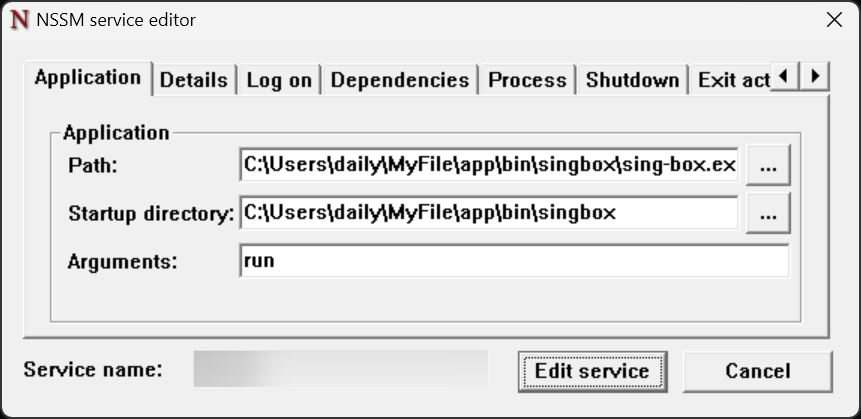
配置完成后,你可以在任务管理器-服务中找到它, 不过此时还没配置完,需要将singbox客户端配置config.json放到singbox.exe的同级目录下,例如:
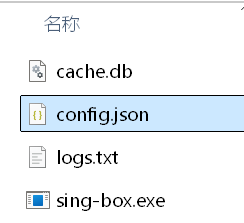
cache.db文件不用管,那是singbox运行后自动生成的.
启动singbox服务
在任务管理器-服务中, 找到singbox, 右键-开始, 几秒钟如果显示正在运行而不显示已暂停,那就说明你的配置对了
配置系统代理
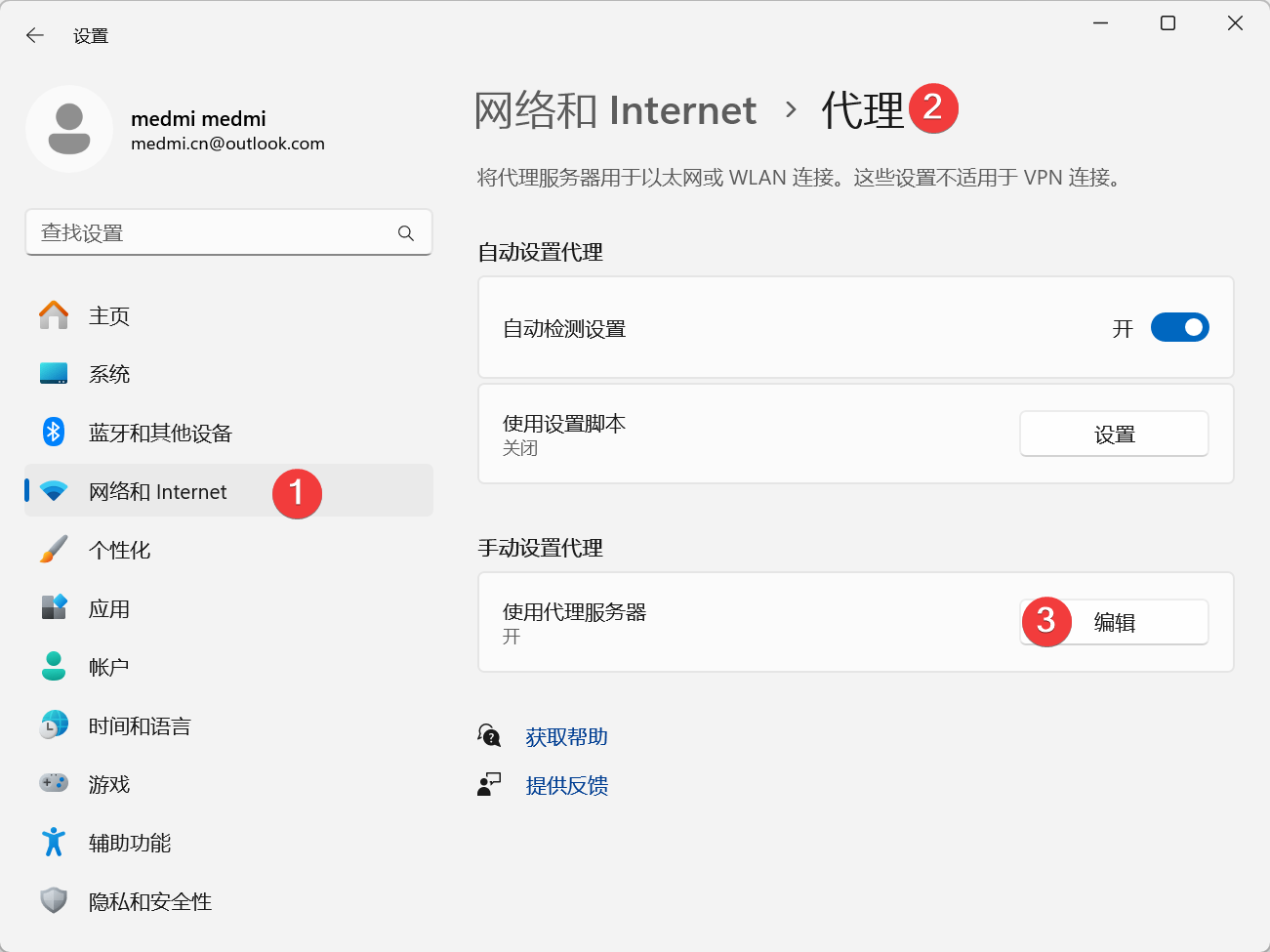 配置如下
配置如下 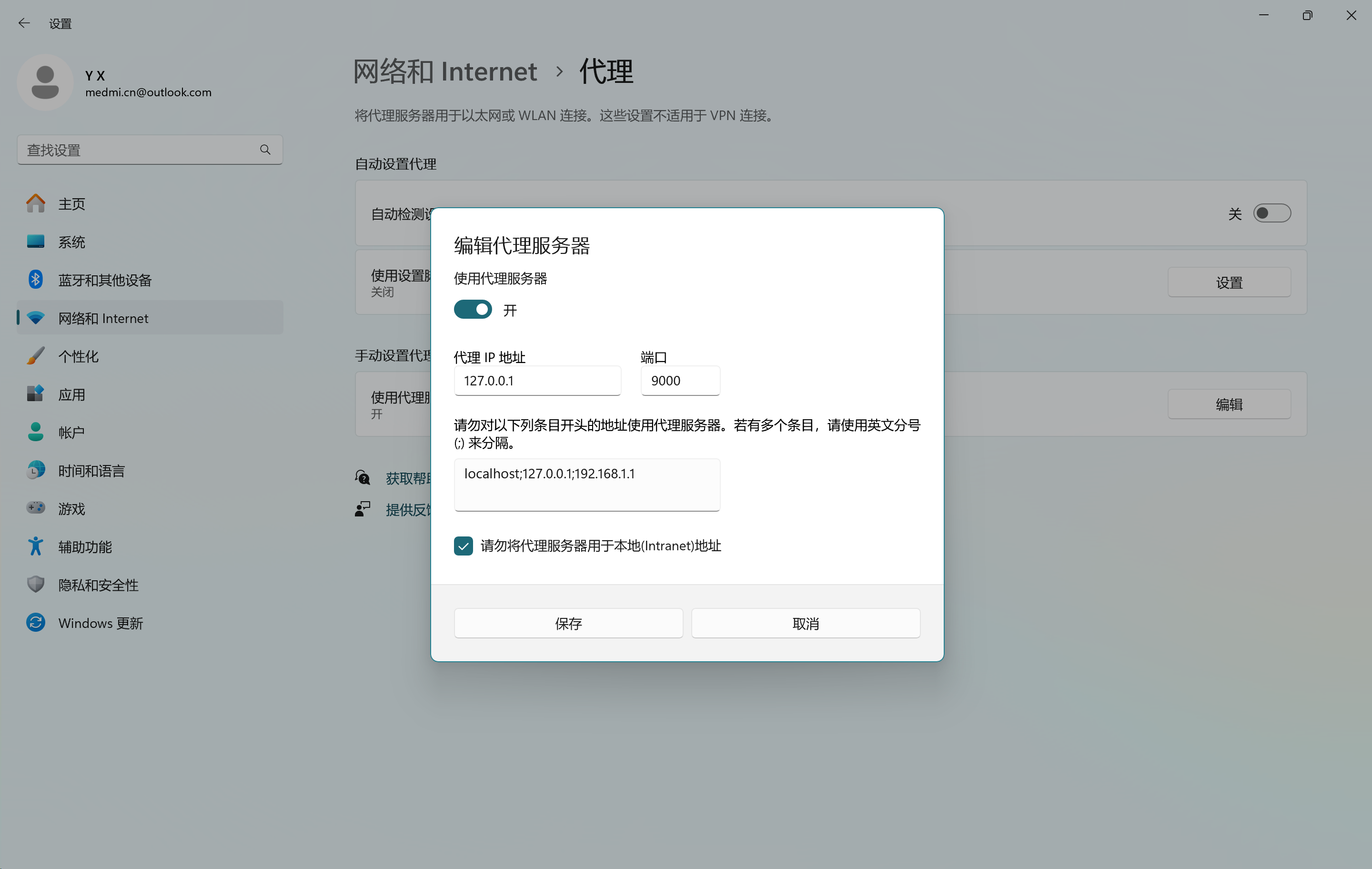 此时打开
此时打开IDEA等jetbrains工具就不会卡了
本文由作者按照 CC BY 4.0 进行授权